Lightbox Addon
The Lightbox Addon opens images in a zoomed overlay when visitors click them. They can click, drag or swipe to navigate through the images.
Get the Addon
Buy the Lightbox Addon, then install it as a WordPress plugin.
How it works
After the addon is installed and active, images can open in the Lightbox on the frontend. Touch navigation is supported on tablets. The Lightbox is disabled for the phone layout by default.
A minimal Lightbox with a white background and high opacity
Image settings
Right-click an image in the Gridder to set a Lightbox caption or exclude one image from the Lightbox. Use Edit Lightbox Caption for captions and Lightbox off for this image when a specific image should not open in the overlay.
Lay Options → Lightbox Addon
Global settings live in Lay Options → Lightbox Addon. They control where the Lightbox is active, how captions behave and how the overlay looks.
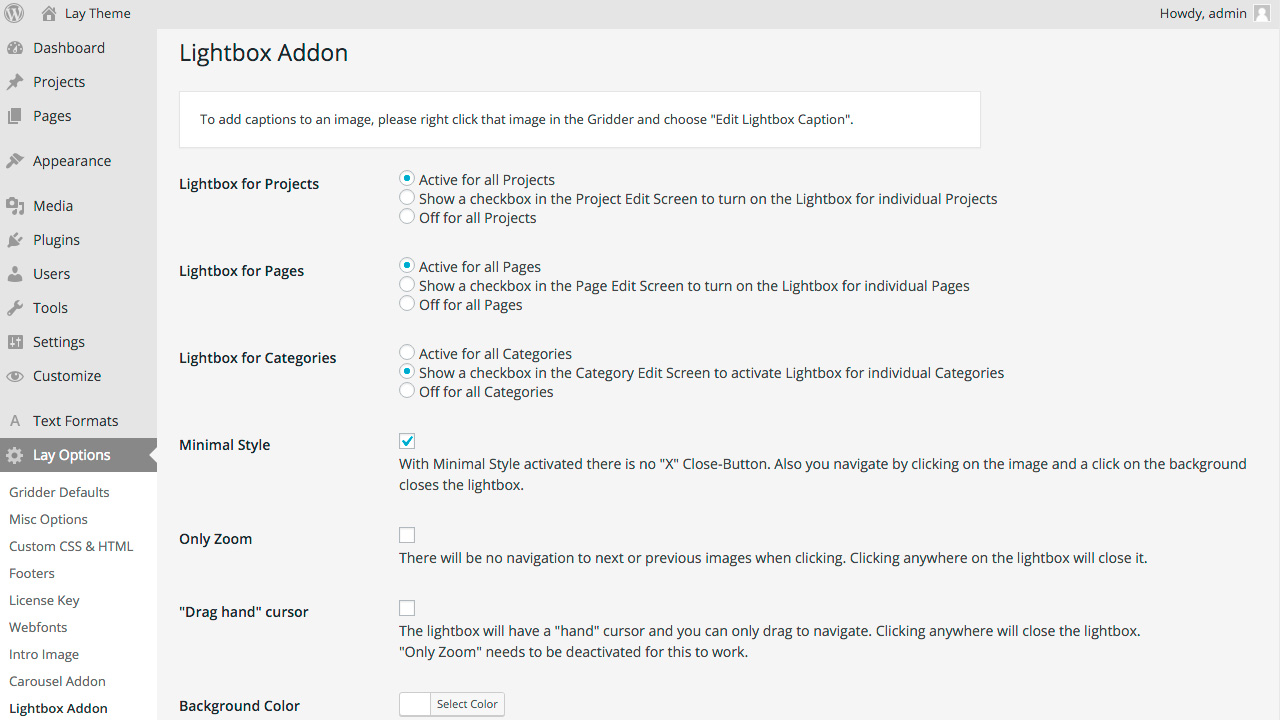
The Lightbox Addon options page
- Activation turns the Lightbox on or off for projects, pages, news posts and categories.
- Captions controls caption text, placement and styling.
- Navigation controls click, drag, swipe and next / previous behavior.
- Appearance sets background color, opacity and minimal style options.
- Image controls spacing around the zoomed image and how large it can become.
- Phone controls whether the Lightbox is enabled on phones and how much space is around images.
For the addon product page, see Lightbox Addon.